

Naming the Net
Website Addresses, URLs, Internet Domains

The Internet? Bah! - 1995 Newsweek article by Cliff Stoll, about why the internet won’t last
Of my many mistakes, flubs, and howlers, few have been as public as my 1995 howler. - also Cliff Stoll
Welcome to Digital Lunchbox, a weekly newsletter of resources to help parents nurture digital wellness in their families.
This week we venture into the world of internet domains, but we could easily spend the whole newsletter discussing the multi-hyphenate writer Cliff Stoll. Astronomer, author, and famous hacker-chaser, Stoll’s work is a joy to read because he brings the ever-endearing human element to technical storytelling. His book, The Cuckoo’s Egg, chronicles his real-life chase of a hacker through the early internet. His relentless curiosity and doggedness is aspirational. Read some reflections on the book’s influence here and here.
And, in 1995, he also quite memorably wrote a Newsweek article predicting the internet’s failure. Navigating the internet was, “at best, an unpleasant chore,” and, “a wasteland of unfiltered data” (was he wrong? Discuss!) He predicted that online shopping, learning, and virtual communication would never take off and would never replace its physical world version. Years later, he good-naturedly acknowledged he was…slightly wrong.
But! Stoll’s opinion - the 1995 one - is a valuable reminder that the internet’s dominance was never a foregone conclusion. It did not land on earth fully formed, like some Greek god emerging from Zeus’s head. At many points throughout its development, the internet’s survival and growth depended on critical innovations, without which it could have stalled out completely.
One such innovation is the humble internet domain.
The early internet relied on numerical IP addresses - long strings of digits that had to be laboriously typed in, to go anywhere on the web. The invention of the Domain Name System (DNS) in 1983 added a human-friendly layer of recognizable words. This was a crucial scalability fix that enabled the internet’s explosive growth. So, when Stoll conducted his famous cyber investigation in 1986, he was likely aided in his web surfing by the “new” DNS. Would he have otherwise given up? Not our hero, but others may have.
So let’s dive into the domain and learn more on how it was created, how to make sure the links we’re clicking on are secure, and how to teach our kids to browse the web safely.
See you next week, when we begin a three-part series on memory. We start with understanding how our brain creates, stores, and recalls information, and how to keep it strong.
Questions or conversation? Reach out at hello@digiwarriormama.com.
SNACKS
A news roundup of interesting articles related to technology and its impact on how kids learn, feel, and stay safe. Bookmark and read at your leisure.
What makes a video game have great learning value (also featured in this week’s Napkin Notes), by Harvard’s Graduate School of Education (GSE).
A new program between Instagram and participating schools to take down harmful content more quickly, by EdSurge.
Home libraries and why they are important, by the World Literacy Foundation.
BIG SANDWICH
The main topic of the week. Peruse and muse with a favorite beverage in hand.
All About URLs and Internet Domains
URL Fundamentals
Why do we have website addresses?
The internet has an unlimited ability to scale, so long as its infrastructure can keep up with its growth. Internet domain names were a crucial innovation during a key moment of growth which made exponential network growth possible.
In the earliest days of the internet, finding a website was like looking up a friend’s phone number in a giant directory. By the early 1980s, all addresses were just long strings of numbers called IP addresses. If you wanted to visit another location on the network, you had to manually look it up and type it in. As more and more computers joined the internet, this method became far too cumbersome.
The solution arrived in 1983, when Paul Mockapetris at the University of Southern California Information Sciences Institute was motivated by a truly poetic source of inspiration: his boss told him to.
Mockapetris kept the underlying numerical structure but added in something for the humans: giving each computer location its own name. Thus, the Domain Name System (DNS) was born, where humans could navigate to a site by typing in memorable words (like example[.]com). Behind the scenes, a type of server called the Domain Name Server translates those words back into the IP address that computers understand. The internet could now scale with human memory, not just machine logic.
What do the parts of a website address mean?
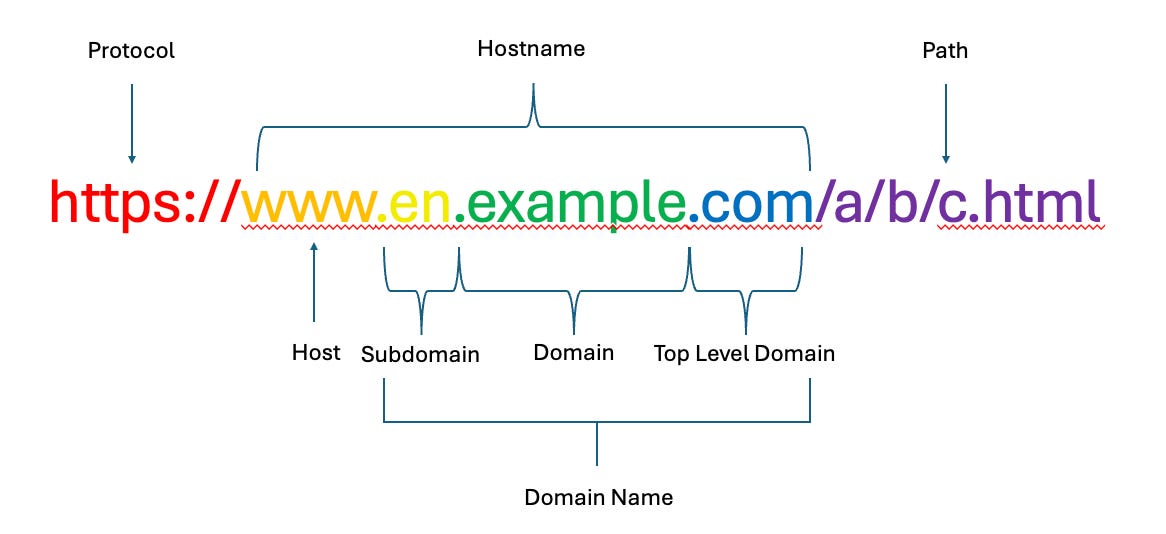
A full website address, or Uniform Resource Locator (URL), is made up of smaller parts, each with its own job. Using the above image, and from left to right:
Protocol: Tells your browser how to access a website. The most common are “http” and “https” which identifies the site as using HTML, or hypertext markup language. The “s” means “secure” and adds an encryption layer to protect the data traveling between your browser and the website.
Host: Typically, “www,” short for world wide web (this piece can be omitted and the site will still work).
Domain name: This is the key part of a web address, and the most important to inspect for legitimacy. It has a few additional subcomponents, which are hierarchal and ordered from right to left (largest to smallest):
Top-level domain (TLD): Everything after the last dot (such as .com .edu or .gov). They indicate the purpose of the site or its sponsoring entity. “.com” is widely used for commercial and general purposes, while “.edu” is for schools and “.gov” is for government agencies. There are over 1,000 TLDs.
Second-level domain: The unique name that is registered with a domain registrar.
Subdomain: Appears before the main name. Site owners can create as many subdomains as they need.
Path: The final piece of a URL, this section follows the TLD and indicates specific pages or files on a site.
How to Identify Legitimate URLs
Cybercriminals often create lookalike domains to trick people into clicking. Some common tactics are detailed well here, and include:
Changing the TLD (such as .com changed to .top).
Adding in a misleading subdomain to mimic the original website (such as google[.]example[.]com instead of the real domain of google[.]com).
Using subtle spelling changes (goggle[.]com or goog1e[.]com for example).
Inserting or omitting dots
Embedding a malicious site behind a link that looks safe.
Tips to spot the fakes:
Hover before you click: Don’t click directly on a link, first hover over it and inspect it to make sure none of those above tricks are present. Is the domain spelled correctly? Is there a sneaky attempt to make a subdomain look like a TLD? Good advice and detail on inspecting links here and here.
Be alert to phishing emails and texts: Be especially wary of common phishing messages that will try to lure users with urgent calls to action.
Be cautious with sponsored search results: Avoid clicking on sponsored links in search engine results. Attackers can buy ad space for fake sites.
Be wary of shortened web addresses: Attackers can use services like bit[.]ly or tinyurl to hide malicious destinations. Use a URL expander tool to preview them before clicking.
How can we teach our kids to navigate domains safely?
The more kids understand the structure of web addresses, the better equipped they’ll be to spot suspicious sites and stay safe online.
For older kids, Khan Academy has a domain name lesson which details how domain names map to an IP address using various servers.
Here’s an engaging explainer on how messages are sent over the Internet using IP addresses:
NAPKIN NOTES
Shining a light on the everyday heroes contributing to digital wellness for children. Inspiration and resources abound.
MIT’s Education Arcade
Mission:
The MIT Education arcade’s mission is to, “playful, powerful learning experiences using the affordances of new educational technologies.”
Saving the day by:
The Education Arcade publishes free games that, “provide a safe, creative environment in which student learn to experiment, collaborate, and problem-solve.” They also develop curriculum resources that integrates inquiry, games and simulations into the learning process. Their coding tools allow students to make their own games.
Who they fight for:
The games are designed primarily for middle school and high school students. The Education arcade website has research and resources for educators.
Superpower:
Their games are built around the concept of, “resonant games,” which have educational value and are engaging for students. Their book outlines these principles: Resonant Games, Design Principles for Learning Games that Connect Hearts, Minds, and the Everyday.
SWEET TREATS
Happy little dismount as you continue on your way.
Bond with your kiddo and spark conversation with this online safety quiz created by the UK Children’s charity, the National Society for the Prevention of Cruelty to Children (NSPCC).